The short answer
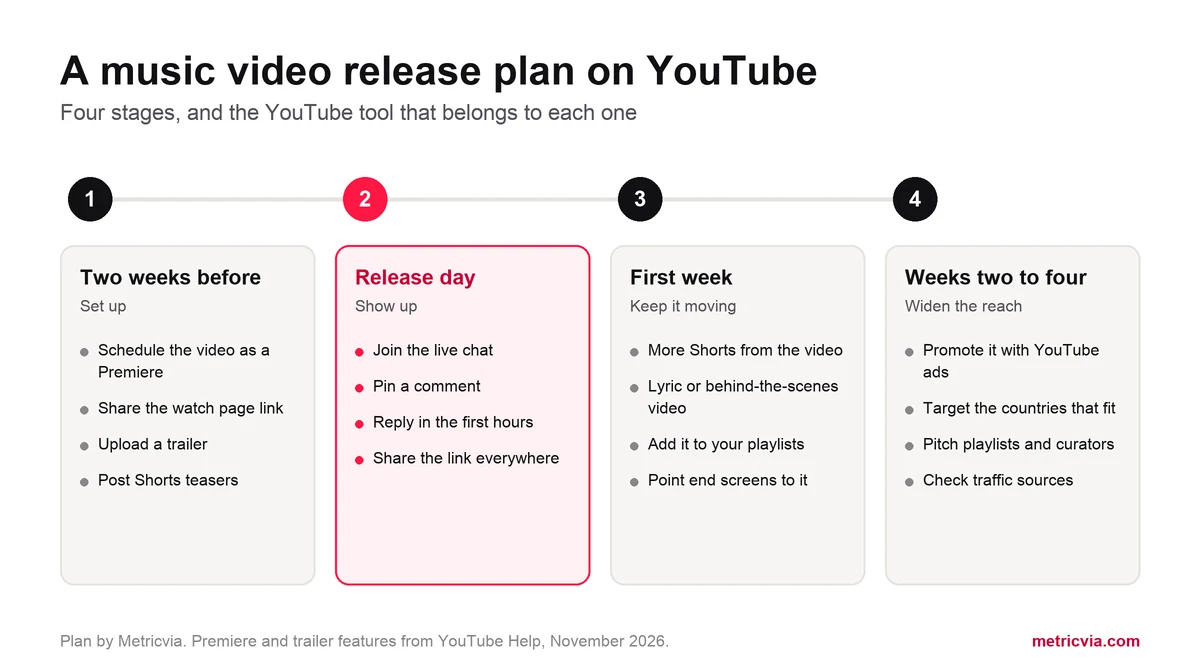
Schedule the video as a Premiere so it has a public watch page before release, share that link, and post Shorts that tease the song. On release day, be in the chat and the comments. In the first week, add supporting videos and playlists. After that, use YouTube ads to show the video to new listeners in the countries where the song fits.
Skip any service that sells plays from bots or panels. YouTube's fake engagement policy prohibits artificially increasing views, likes and other metrics, and those plays never turn into listeners.
| Stage | What to do | Where in YouTube |
|---|---|---|
| Two weeks before | Schedule the video as a Premiere and share the watch page | Studio, Upload, Schedule |
| Two weeks before | Post Shorts that tease the song | Shorts upload screen |
| Release day | Join the chat, pin a comment, reply to viewers | Premiere watch page |
| First week | Publish a lyric or behind-the-scenes video | Your channel |
| First week | Add the video to playlists and end screens | Studio, Editor |
| Weeks two to four | Promote the video to new listeners by country | YouTube Promote or Google Ads |
| Every week | Check where viewers came from | Studio, Analytics, Reach |
What should you set up before release?
Start with a Premiere. When you schedule a video as a Premiere, YouTube creates a public watch page before the video goes live. According to YouTube Help, you can share that page straight away, and anyone who opens it can set a reminder, leave a comment or chat. A viewer who sets a reminder gets a notification about 30 minutes before the Premiere and another when it starts.
That gives you one link to promote for two weeks, where you would otherwise only have a release date. Put it in your bio, your posts and your newsletter. You can also upload a trailer, which plays on the watch page until the Premiere begins, and choose a countdown theme. Two limits to know: Shorts are not supported for Premieres, and neither is video above 1080p.
If you release through a label or a distributor, ask them about an Official Artist Channel. YouTube says it brings your subscribers and content together from your own channel, your topic channel and a Vevo channel if you have one, and gives you Analytics for Artists. You need at least one official release delivered by a distributor or label, and the request goes through that partner, not through a form you fill in yourself.
What should you do on release day?
Be there. During a Premiere, viewers watch the video together in real time after the countdown, and the live chat runs next to it. An artist who is in that chat, answering by name, gives fans a reason to come at the set hour and not later. YouTube notes that viewers can rewind during a Premiere but cannot skip ahead of what has been shown.
When the Premiere ends, the video stays on your channel as a normal upload, the view count from the Premiere carries over and the chat can be replayed. Now move to the comments: pin one with the streaming links or the story behind the song, heart the ones you like and reply for the first few hours.
For a wider checklist of what to check and when, see our guide to the first 48 hours after publishing.
- Send the link to your mailing list and post it on every profile at the Premiere hour.
- Pin a comment and reply to viewers while the video is new.
- Set the Premiere as your channel trailer so new visitors see it first.
What should you do in the first week?
Give the song more than one door. YouTube's Weekly Top Songs chart combines views for each official version of a song: the official music video, lyric videos and user-made videos that use the official song. Every extra version is another way for a listener to find the track.
A lyric video, an acoustic take, a behind-the-scenes cut or a short explanation of the song all count as reasons to come back to the channel in the same week. Link each one to the main video with an end screen, and keep posting Shorts cut from the video itself.
- Publish one supporting video in the first week, not five on the same day.
- Add the music video to an end screen on your older videos.
- Answer new comments daily while the video is still fresh.
How do you promote a music video with Google Ads?
Ads show the video to people who do not know you yet. You can start one inside YouTube Studio with Promote, or build a video campaign in Google Ads for more control. YouTube's Promote help page says you choose the locations, languages, demographics and interests for the campaign, and that the views and subscribers it brings are legitimate.
The format matters. Skippable in-stream ads play before or during another video and suit a release where the goal is awareness. In-feed ads show your thumbnail and title in search results, on the home feed and next to related videos, and only play when someone clicks, so the viewers they bring chose the song.
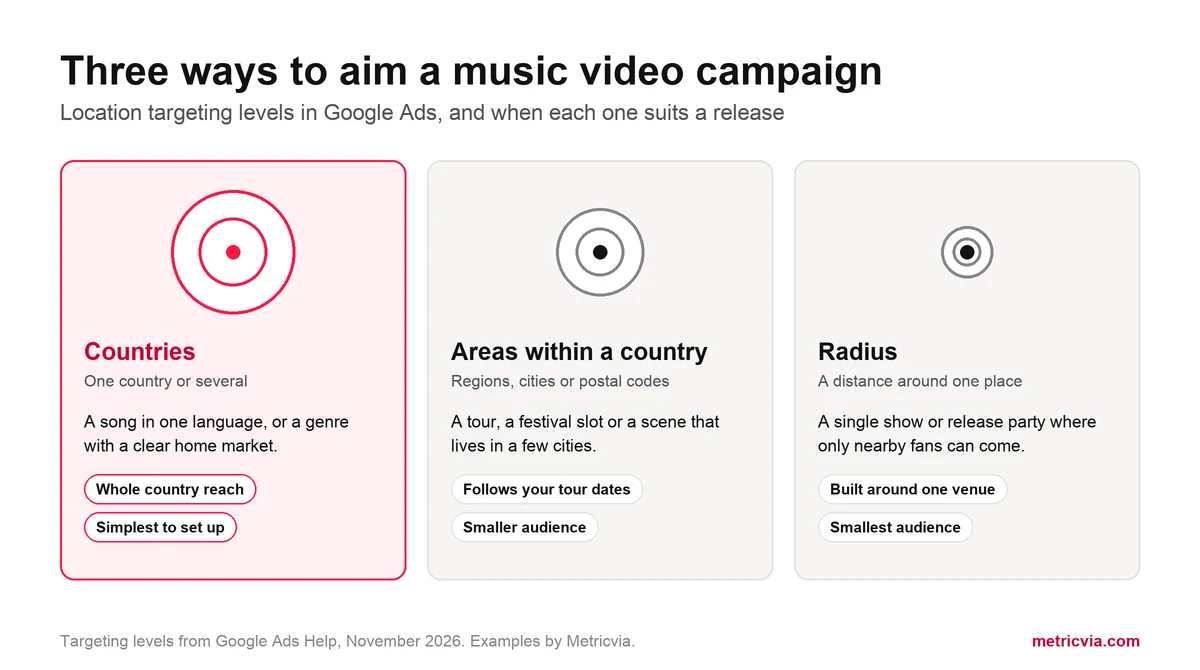
Then decide where. Google Ads lets you target countries, areas within a country or a radius around a place. Google adds that location targeting works from several signals and is not accurate in every case. A song in one language belongs in the countries that speak it. An instrumental or a dance track can travel much further. Our comparison of worldwide and country-targeted promotion goes through that choice in detail.
Know the limits before you spend. YouTube states that paid advertising views do not count toward YouTube Charts, and that watch hours and subscribers gained through ad campaigns do not count toward the Partner Program thresholds. Ads are for finding listeners, not for a chart position.
If you would rather not run the campaign yourself, Metricvia runs each views order as a Google Ads campaign from a public video link, worldwide or in one of 17 countries. The sizes and prices are on our buy YouTube views page.
Do playlists and curators still matter?
Yes, and the first playlists to build are your own. Anyone can make a playlist on YouTube, so give a new listener an obvious next step: one playlist with all your official videos, and one with the new song in every version. Link them from the video description and from the channel home page.
Then look outward. Channels and playlists in your genre, music blogs and local radio pages often share YouTube links. Send a short, personal note with the link, one sentence on the song and why it fits what they feature. A few placements that match the genre bring better listeners than a long list that does not.
Be careful with anyone who sells playlist placement with a promised number of plays. If the plays do not come from people choosing to listen, they fall under the same fake engagement policy as bot views.
What should you measure?
Start with where viewers came from. In YouTube Studio, open the video, select Analytics and then Reach. Views from an ad campaign appear under "YouTube advertising", separate from search, suggested videos and external sites. Our guide to YouTube traffic sources explains every line of that report.
Then look at who stayed. A release has done its job when new viewers watch most of the video, open a second one and subscribe. Count those, and not the view total alone.
- Traffic sources: which share came from Shorts, search, suggested videos, external links and ads.
- Audience geography: whether the countries you targeted are the ones watching.
- Subscribers gained from the video, and views on your other videos in the same week.
- Music Insights, YouTube's tool that shows where an artist's music is trending by city and region.
What to avoid
A release is a short window, and that is when shortcuts look most tempting. These cost money and leave nothing behind.
- Bot or panel views: they are what the fake engagement policy is written for.
- Paying for ads to climb a chart: paid advertising views do not count toward YouTube Charts.
- Any service that asks for your password or access to the channel.
- Releasing with no watch page to share: schedule the Premiere first, then announce the date.
Frequently asked questions
Should I premiere a music video or just upload it?
A Premiere gives you a public watch page to share before release, reminders for fans and a live chat at the release hour. After it ends, the video stays on your channel as a normal upload and keeps the views from the Premiere.
Do views from ads count on a music video?
YouTube says views and subscribers gained through its Promote tool are legitimate. Two things do not count: paid advertising views are left out of YouTube Charts, and watch hours and subscribers from ad campaigns do not count toward the Partner Program thresholds.
How do I get an Official Artist Channel?
Through a partner. YouTube asks artists to request it from their label or distributor, or from a music service partner listed in its Services Directory. You need at least one official release on YouTube delivered by a distributor or label.
Which countries should I target with a music video?
Start with the countries where the language and the genre already have listeners. A song with lyrics in one language fits the markets that speak it; instrumental and dance music can be shown more widely.
Can I premiere a Short?
No. YouTube does not support Shorts for Premieres. Use Shorts as teasers and, once the music video is live, add a related video link that leads to it.
Official references
Platform rules and product names can change. Use these official YouTube and Google pages to verify the current position before making a campaign or monetisation decision.