The short answer
Open a video in YouTube Studio, select Analytics, then Reach, and read the card called "How viewers find this video". Each line is one way people arrived. The largest lines tell you what is carrying the video right now.
There is no ideal percentage for any source. A tutorial and a vlog can both do well with completely different mixes, so compare a video with your own similar videos and not with a number from someone else's channel.
Where do you find traffic sources in YouTube Studio?
YouTube puts the report on the Reach tab of each video. These are the steps from YouTube Help, November 2026:
- On a computer: sign in to YouTube Studio, select Content in the left menu, select Analytics on your video, then select Reach at the top.
- In the YouTube Studio app: go to Content, select the video, tap the Analytics card, then tap Reach.
- On either one, find the card "How viewers find this video". That card lists the traffic source types.

What does each traffic source mean?
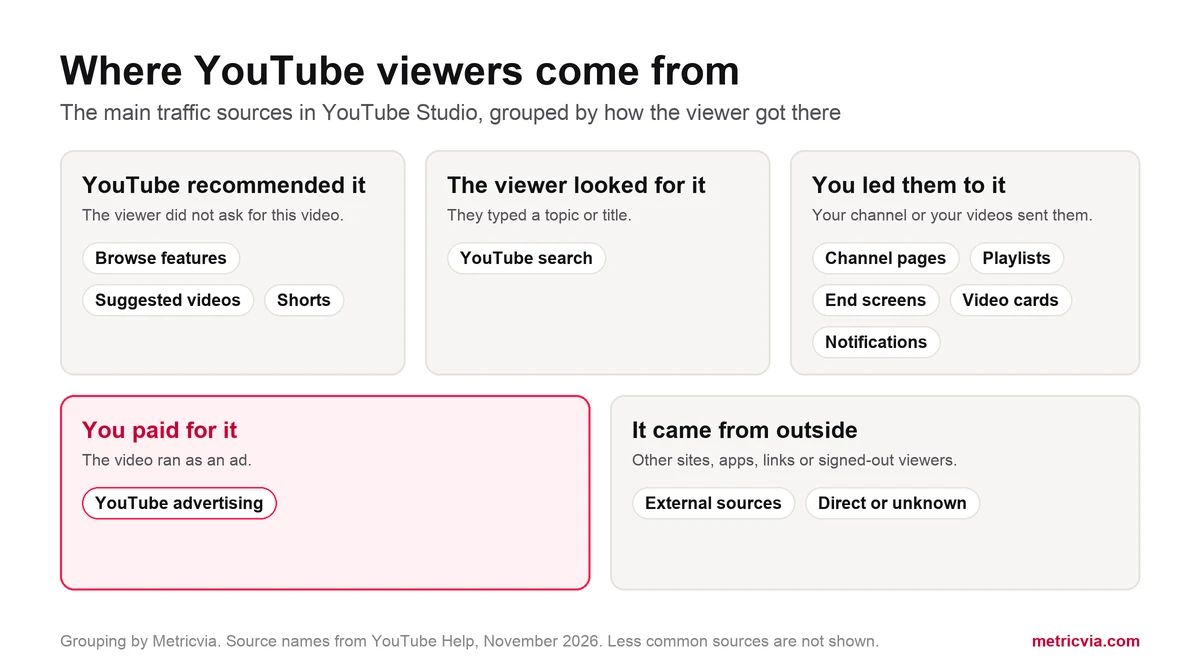
YouTube lists sources from inside YouTube and sources from outside it. The table below covers the ones most channels see. Your report only shows sources that sent viewers to that video, so a short list is normal.
| Traffic source | Where the viewer came from |
|---|---|
| Browse features | Home, Subscriptions, Watch Later and other places people browse |
| Suggested videos | Suggestions next to or after other videos, and links in video descriptions |
| YouTube search | YouTube search results |
| Shorts | The vertical Shorts viewing experience |
| Channel pages | Your channel or another YouTube channel |
| Playlists | Any playlist with your video, including other creators' playlists and viewers' Liked videos |
| Notifications | Notifications and emails sent to subscribers |
| End screens | End screens in videos |
| Video cards | A card in another video |
| YouTube advertising | Your video was used as an ad on YouTube |
| External sources | Websites and apps that embed or link to your video |
| Direct or unknown | Direct URL entry, bookmarks, signed-out viewers and unidentified apps |
How do you see the exact searches and websites?
Four sources have their own detail cards, and these are often the most useful part of the report. They turn a general source into a specific name you can act on.
- Traffic source: YouTube Search shows the terms people used to find the video.
- Traffic source: Suggested videos shows the videos yours appeared next to.
- Traffic source: Playlists shows which playlists sent viewers.
- External sites or app shows the sites and apps that sent viewers.
What does a healthy traffic mix look like?
YouTube does not publish a target mix, and a fixed number would not help you. The right mix depends on the video. A how-to video people look for can live on search for a long time. An entertainment video usually depends more on Browse features and Suggested videos. A Short depends on the Shorts feed.
A better test is whether the mix makes sense for what you made. Compare the video with your own similar videos at a similar age. If a tutorial gets almost nothing from search, the title may not match what people type. If most views on a new upload come from your channel page and notifications, the video has reached your existing audience but has not spread further yet.
Relying on one source is worth watching too. A channel that gets nearly everything from one place feels any change there more strongly. Our guide to why videos are not getting views covers what to check when the whole report is small.
How do promoted views appear in traffic sources?
When your video runs as an ad, YouTube shows those views under their own line: YouTube advertising. This is how you separate paid viewers from organic ones, and it is the place to check any promotion you pay for, ours included.
The rules for that line are specific. In Analytics, YouTube says a skippable ad longer than 10 seconds counts as a view when someone watches 30 seconds or until the ad ends, and non-skippable ads never count as views. The public counter follows a different rule: YouTube says public ad views on Shorts and in-stream ads are counted when the ad starts to play. So the public number and the advertising line may not match. Our guide on how YouTube counts views explains the different counts.
To judge a campaign, compare the average view duration of the YouTube advertising line with your organic lines. If paid viewers stay about as long, the audience is a good match. If they leave quickly, look at the targeting and the opening of the video. Our step-by-step guide to promoting a video with Google Ads covers the setup, and Metricvia view campaigns run through Google Ads, so they can be checked in this same report.
What should you do when one source drops?
Check the date range first, then find out which source fell. A drop in one line points to a different cause than a drop in all of them. The table lists where to start; these are starting points, not proof of a cause.
| Source that fell | What to check first |
|---|---|
| Browse features | Impressions and click-through rate compared with your similar videos; try a new thumbnail or title |
| Suggested videos | The Suggested videos detail card: which videos stopped sending viewers |
| YouTube search | The YouTube Search detail card: did interest in the term fall, or did another video take the spot |
| Shorts | How your newest Shorts compare with older ones |
| External sources | The External sites or app card: did a link or embed get removed |
| YouTube advertising | Whether a campaign ended; this line stops when ads stop |
Frequently asked questions
What is YouTube advertising traffic?
It means your video ran as an ad on YouTube. YouTube shows those views as their own traffic source, separate from organic sources such as Browse features and YouTube search.
Why is Browse features low on my video?
Browse features covers places like Home and Subscriptions. It can be low when a video mainly reaches people through search or Suggested videos, or when it has not been shown to many viewers yet. Compare it with your similar videos before changing anything.
Does ad traffic count for monetization?
No. YouTube says views and watch time from paid ad campaigns do not count toward Partner Program thresholds. Only Follow-on Views count, which YouTube describes as organic views you get when someone watches your videos after seeing your promoted content.
What does Direct or unknown mean?
YouTube says this source covers direct URL entry, bookmarks, signed-out viewers and unidentified apps, so a share of it is normal. It does not tell you the exact place each viewer came from.
Where do clicks from video descriptions show up?
YouTube includes links in video descriptions under Suggested videos, not External sources. External sources covers websites and apps outside YouTube that embed or link to your video.
Official references
Platform rules and product names can change. Use these official YouTube and Google pages to verify the current position before making a campaign or monetisation decision.